Dashboard
Revenue at a glance
Where revenue stands, the moment you log in.
Active leads, pipeline value, won revenue and win rate on one screen, with open value by stage, your top leads and the latest activity underneath.
Dashboard
Active leads
48
of 126 total · 9 new this week
Pipeline value
$587.6K
across 4 open stages
Won revenue
$86.4K
from 21 won deals
Win rate
27%
21 won · 57 lost
Open value by stagePoint at a stage
Top open leads
- Daniel Okafor91
- Ravi Menon88
- Emma Clarke86
Before and after
Monday numbers without the spreadsheet. One screen, already current.
Most teams rebuild the pipeline in a sheet before every standup. The dashboard reads it from the deals you already track.
- Prepare the standupCRM exportspreadsheetslides
- Check one rep's dealsFilter the exportpivot table
- Spot the hottest leadsSort a sheetgut feel
Key numbers
Four numbers that start every standup.
Active leads, pipeline value, won revenue and win rate update as deals move, so nobody rebuilds a spreadsheet before the meeting.
Switch between the whole workspace and the deals assigned to you. Each panel links through to the leads, board or analytics behind it.
- Active leads, and how many are still in New
- Pipeline value across every open stage
- Won revenue and win rate from closed deals
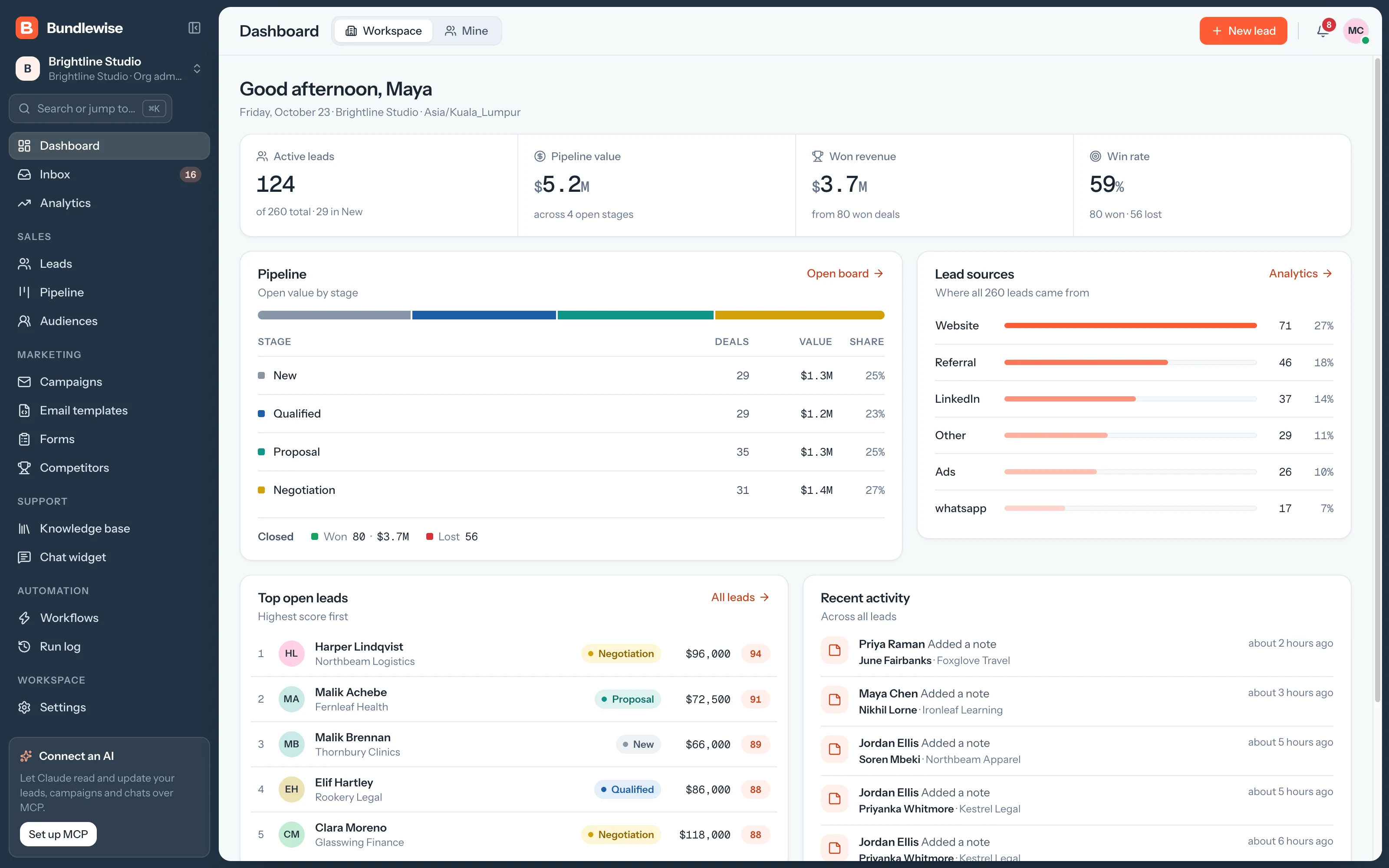
Every stage shows its deal count, value and share of the pipeline, with won and lost totals underneath. Custom stages appear as soon as you add them.
- Deal count, value and share per stage
- Won and lost totals
- Open board jumps straight to Pipeline
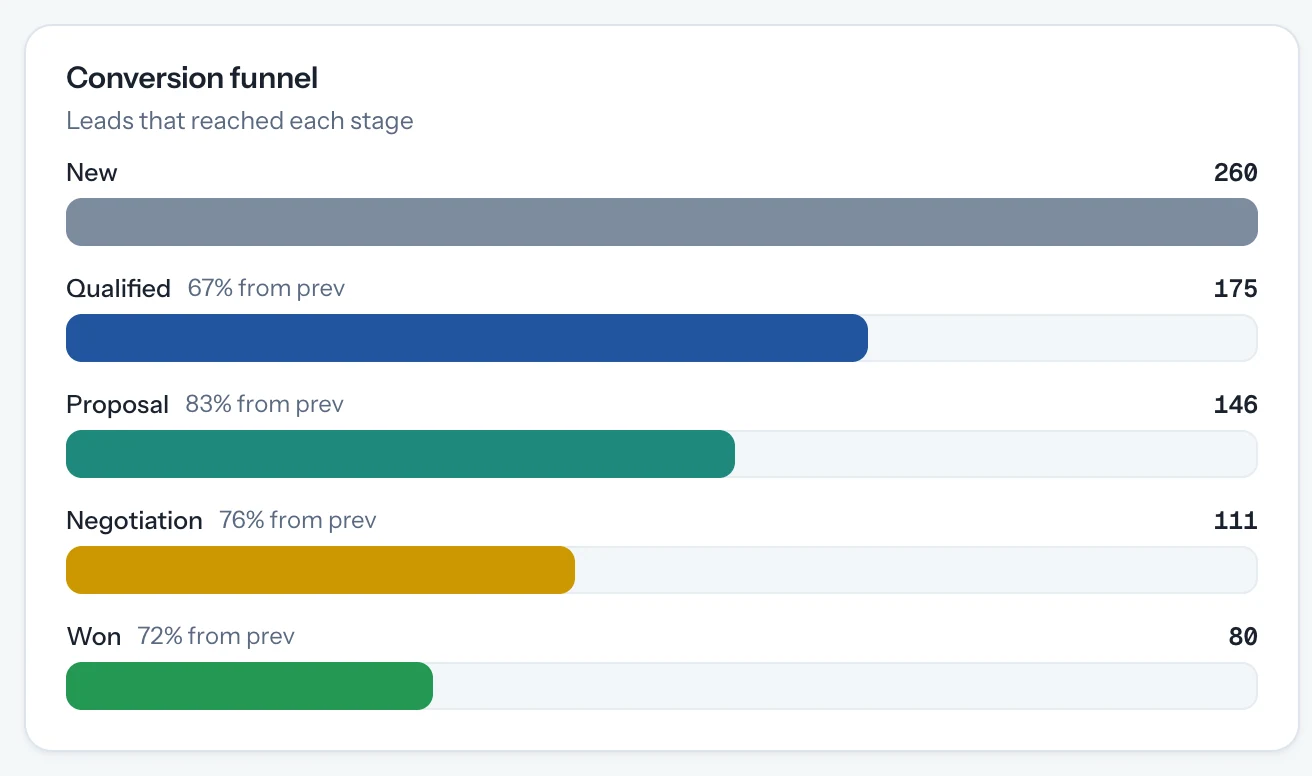
Top open leads are ranked by score, highest first. Recent activity lists new captures, emails, notes and stage changes from across the team.
- Top open leads ranked by 0–100 score
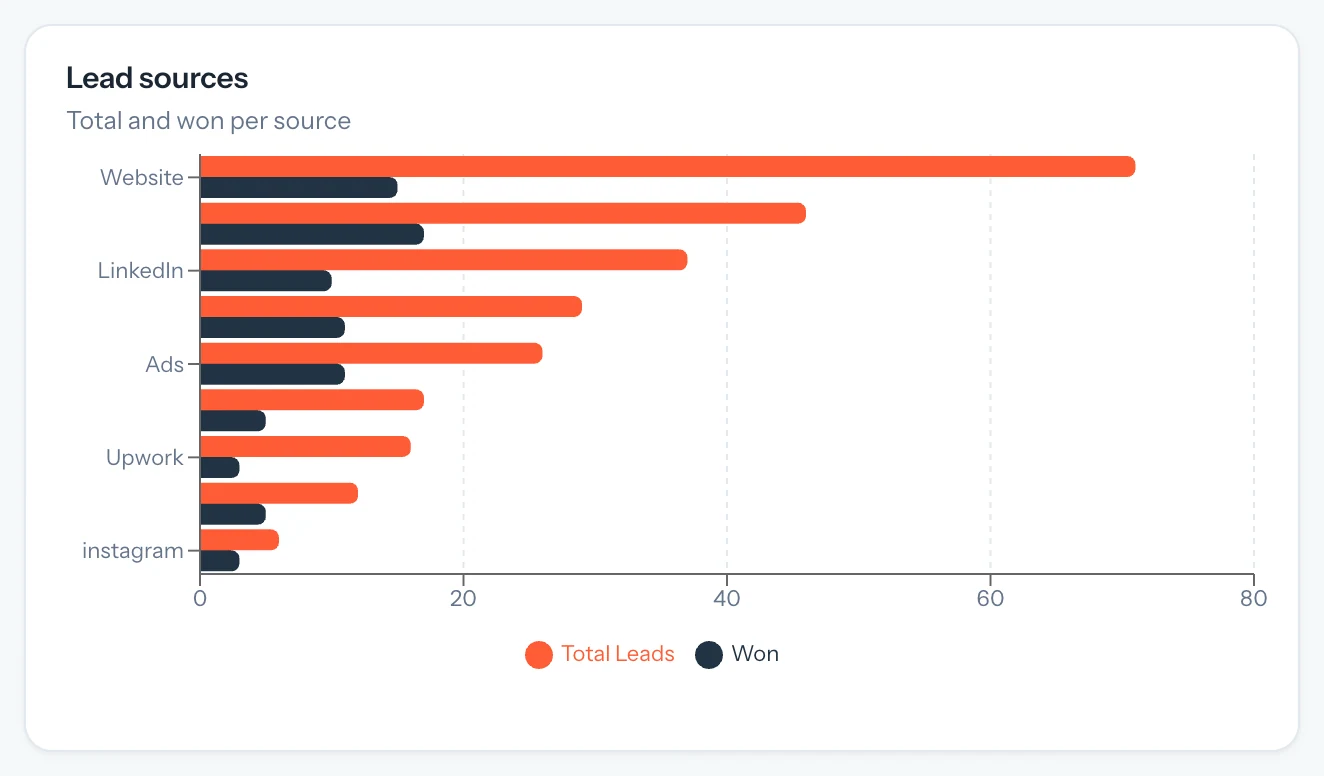
- Lead sources at a glance
- Recent activity from every teammate
Capabilities
Everything you check first thing. Nothing to set up.
KPIs
Four key numbers
Active leads, pipeline value, won revenue and win rate, recalculated as deals move.
Stages
Open value by stage
Deal count, value and share for every stage, custom ones included, with won and lost totals.
Scope
Workspace or Mine
One switch narrows every panel to the leads and deals assigned to you.
Feed
Recent activity
New captures, emails, notes and stage changes from the whole team, newest first.
By the numbers
One screen instead of a weekly report.
- key numbers
- 4
- Active leads, pipeline value, won revenue and win rate.
- reports to build
- 0
- Every panel reads straight from your leads and deals.
- switch to Mine
- 1
- From the whole workspace to just your own deals.
By team
Who opens it first. And what they check.
Agency owner
Know where revenue stands before the first call.
Check pipeline value and won revenue across every client project without asking anyone for an update.
Agency owner playbook0/4 done
- Open the dashboard on Workspace
- Check open value by stage
- Open the top lead that hasn't moved
- Jump to Analytics for the trend
What your agent can do
Read and act across the whole workspace.
Connect Claude, ChatGPT, Cursor, Claude Code, Codex or Antigravity. Sign in with OAuth, then find hot leads, preview campaigns and build workflows in plain language, on live CRM data.
- Claude Desktop
- ChatGPT
- Cursor
- Claude Code
- Codex
- Antigravity
/api/v1/mcp · OAuth
Which deals moved to Proposal this week?
Yes. Switch the dashboard from Workspace to Mine to see the leads and deals assigned to you.
From the deal value on leads in the Won stage. If it looks low, check that your won deals have a value set.
Yes. They change as leads are added and deals move, so the dashboard always shows the current pipeline.
Start every day with the numbers.
Add your leads and see pipeline value, won revenue and win rate in minutes.